

Get Verified, Hallucination-Free Answers
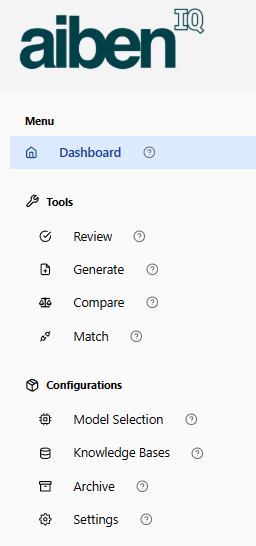
What’s Inside AibenIQ?
Dashboard – Your starting point for tracking activity and navigating features.
🛠 Tools:
Chat/Ask – Your Direct Line to the Truth
Use Chat/Ask (right side) to get fact-based answers—no hallucinations—each one traceable to the exact paragraph and page.
Review – Analyze documents and extract key insights.
Generate – Create summaries or draft content based on source material.
Compare – Spot differences across document versions instantly.
Match – Align content across files for consistency.
⚙️ Configurations:
Model Selection – Choose the AI model best suited to your workflow.
Knowledge Bases – Manage document sets that power your answers.
Archive – Store completed work securely.
Settings – Customize preferences and access controls.
Now supporting 45+ languages
Work in your native language—no matter the original language of the documents.
The UI, questions, and answers adapt to your preferred language for seamless work.
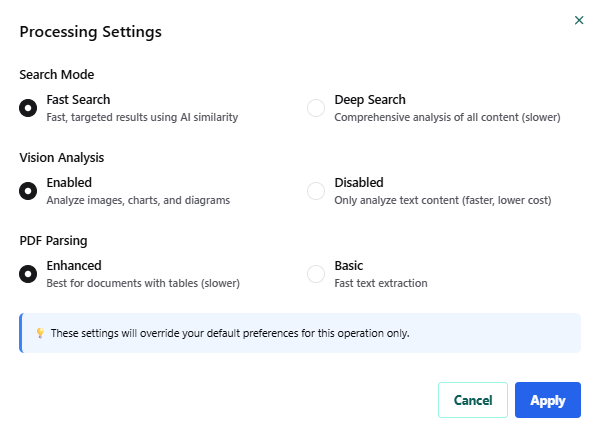
Processing Settings — How to Use Them
Adjust these options to control how AibenIQ processes your documents for this specific operation. These settings override your default preferences only for this task.
– Upload a sample document
– Ask a question → get a page-referenced answer
– Visual traceability (highlight source text on page
– Limited to one file, max 200 pages
